← Support
Tracking
Live timers
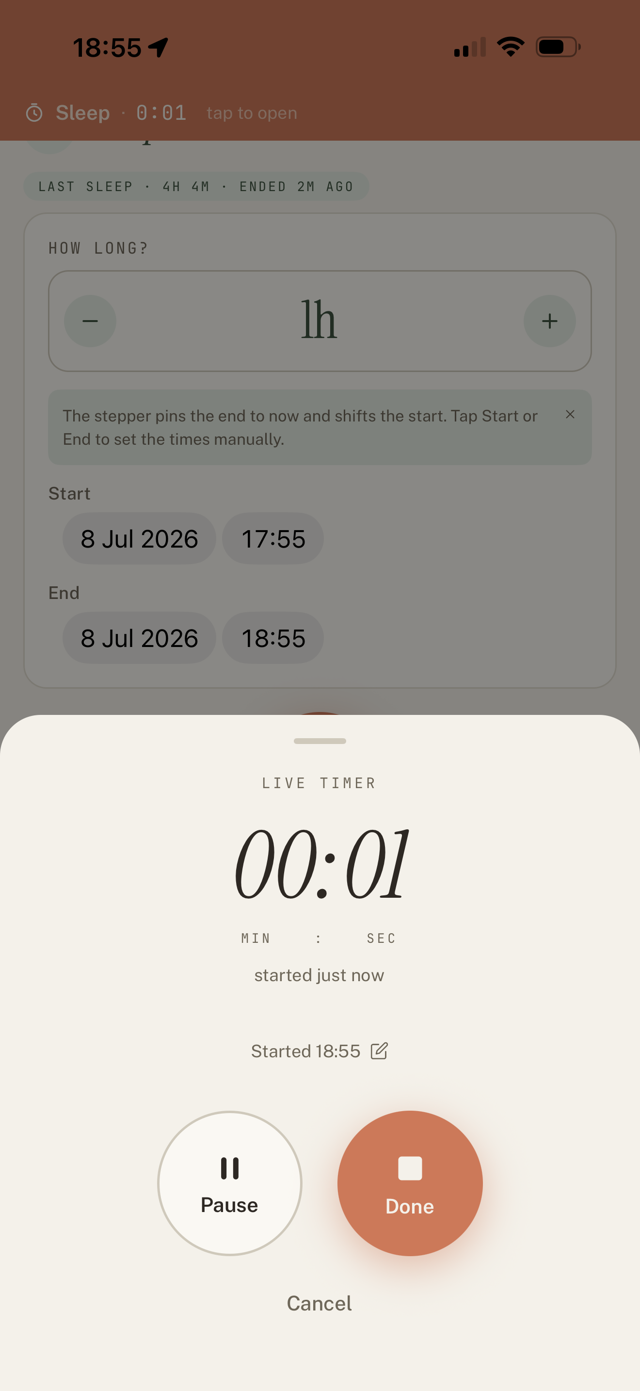
Feeds and sleeps can be timed live instead of typed in. The timer keeps running with the app closed or the phone locked, and on iPhone it shows on the lock screen and Dynamic Island.
Start and stop
- On the Feeding or Sleep screen, tap Start live timer.
- Tap Done when it ends. The start, end, and duration are saved for you.
Pause and resume
If your baby stirs mid-sleep, tap Pause, then Resume. The break is left out and it still logs as one sleep.
Fix a forgotten start
Forgot to hit Start on time? Tap the "Started ..." line in the timer and set the real start time. You can change the date too, for naps that cross midnight. The timer recalculates.
Hand off between caregivers
Live timers are shared. If your co-parent started a sleep, you can take it over or end it from your own phone, and it still logs as a single event.
Still have a question?
We're a small team and we read everything. Email us and we'll get back to you.