Apple Watch
Little Bean on your Apple Watch
With the watch app you can start and stop feed and sleep timers, log a diaper, and see what happened last, all without picking up your phone. The watch face complication shows what is happening right now, so a night check is a glance, not a screen.
The Apple Watch app is included in every Little Bean plan and during the free trial. Subscribing happens on your iPhone; the watch unlocks automatically.
What you need
- The Little Bean iPhone app, version 1.1.0 or newer (update it in the App Store).
- An Apple Watch running watchOS 10 or later. That is Apple Watch Series 4 or newer, the SE models, and Ultra. If your watch cannot update to watchOS 10, the app will not appear in the list below.
Install it
The watch app usually does not install by itself. It takes four taps:
- On your iPhone, open the Watch app (Apple's own app, with the watch icon).
- Stay on the My Watch tab and scroll down to Available Apps.
- Find Little Bean and tap Install.
- Wait a moment. Little Bean appears on your watch, signed in and ready.
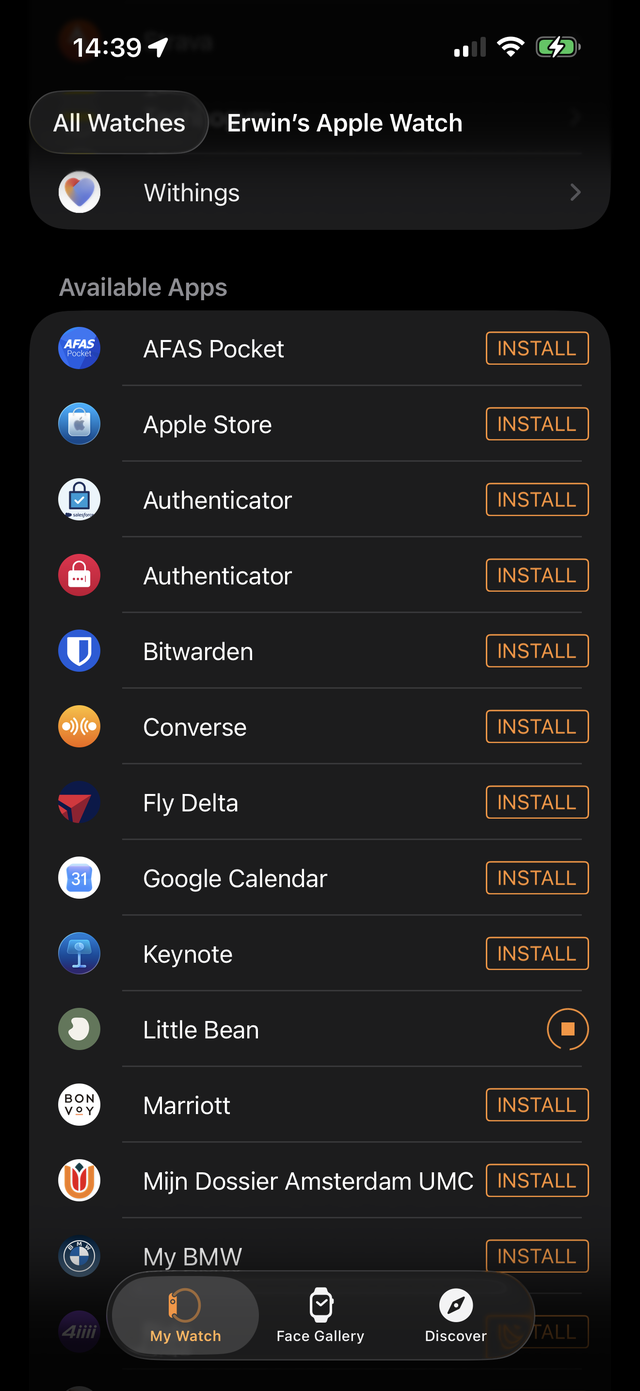
If you want future apps to appear on your watch without this step, turn on Watch app → App Store → Automatic App Install.
Once installed: Log from your wrist and the watch face complication cover what the app can do.
Good to know
- One live timer runs at a time, and the watch controls the timers you started. Your partner's timers stay on their own devices.
- Logs from the watch sync to your iPhone and to every caregiver on your account, like any other entry.
- The watch app speaks the same 16 languages as the phone app.
The app does not appear in Available Apps?
- Check that your iPhone has Little Bean 1.1.0 or newer: open Little Bean, go to Settings, and look at the version at the bottom.
- Check your watchOS version in Watch app → General → About → Version. Below watchOS 10, the app cannot be installed.
- Restart both your iPhone and your Apple Watch, then look again. Pairing hiccups are common and a restart clears most of them.
Still stuck? Email us at [email protected] and mention your watch model and watchOS version.
Still have a question?
We're a small team and we read everything. Email us and we'll get back to you.